01Right now
Menu bar
- System power with a 60-second live chart
- Adapter or battery power source and flow
- Estimated battery health, temperature, cycles
- Adapter capability and battery power

Power monitor for the Mac menu bar
The real app
Open the menu bar panel for right now, the Details window for longer stretches, and keep the widget on your desktop for the last hour.
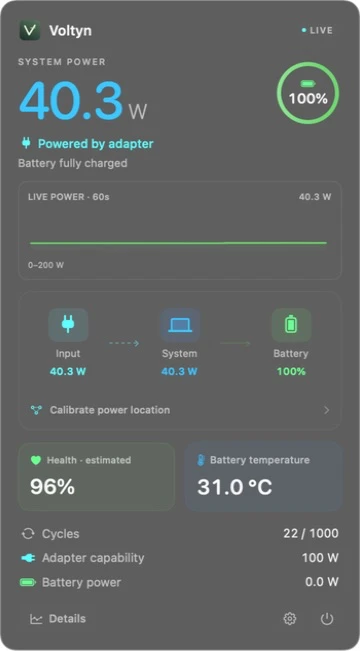
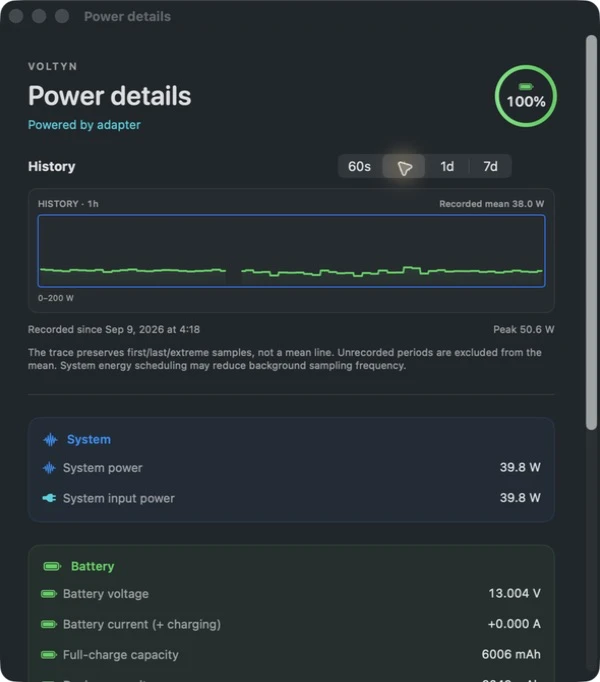
Screenshots show the actual Voltyn 2.0 interface. The widget is an illustration with sample values.
01Right now
02Last hour
The widget shows a snapshot, not a continuously refreshing gauge. Read it with its update time.
03Whole week
Readings
Voltyn shows three readings separately and labels each one.
Your power history stays on your Mac. No account, no ads, no automatic telemetry, and no analytics on this website.
Read the privacy notesFAQ
MacBook models with Apple silicon (M-series chips) running macOS 14 or later. Intel Macs and desktop Macs are not supported.
No. Voltyn is a one-time purchase on the Mac App Store with no subscription and no in-app purchases. The price shown on the App Store for your region applies.
Adapter capability is the most your charger can deliver, system power is what your Mac is using, and input power is the current reading on the supply side. A lower reading does not mean your charger or cable is faulty.
The menu bar shows live system power, while the medium widget shows a recorded one-hour mean tied to its snapshot time. Different time scales usually mean different numbers.
Not automatically. Recorded power history stays on your Mac with no automatic telemetry. Content only leaves your device when you send an email, screenshot or feedback yourself.
Apple Silicon MacBook · macOS 14 or later · One-time purchase
Support guide